Ingress Nginx with Internal NLB and ACM
- kubernetes
- aws
- ingress
- nginx
- nlb
- acm
Overview
This guide demonstrates how to configure network architecture using ingress-nginx controller in combination with Internal Network Load Balancer (NLB) and AWS Certificate Manager (ACM). It's intended for DevOps Engineers and SREs who manage Kubernetes clusters and Ingress resources.
Environment Setup
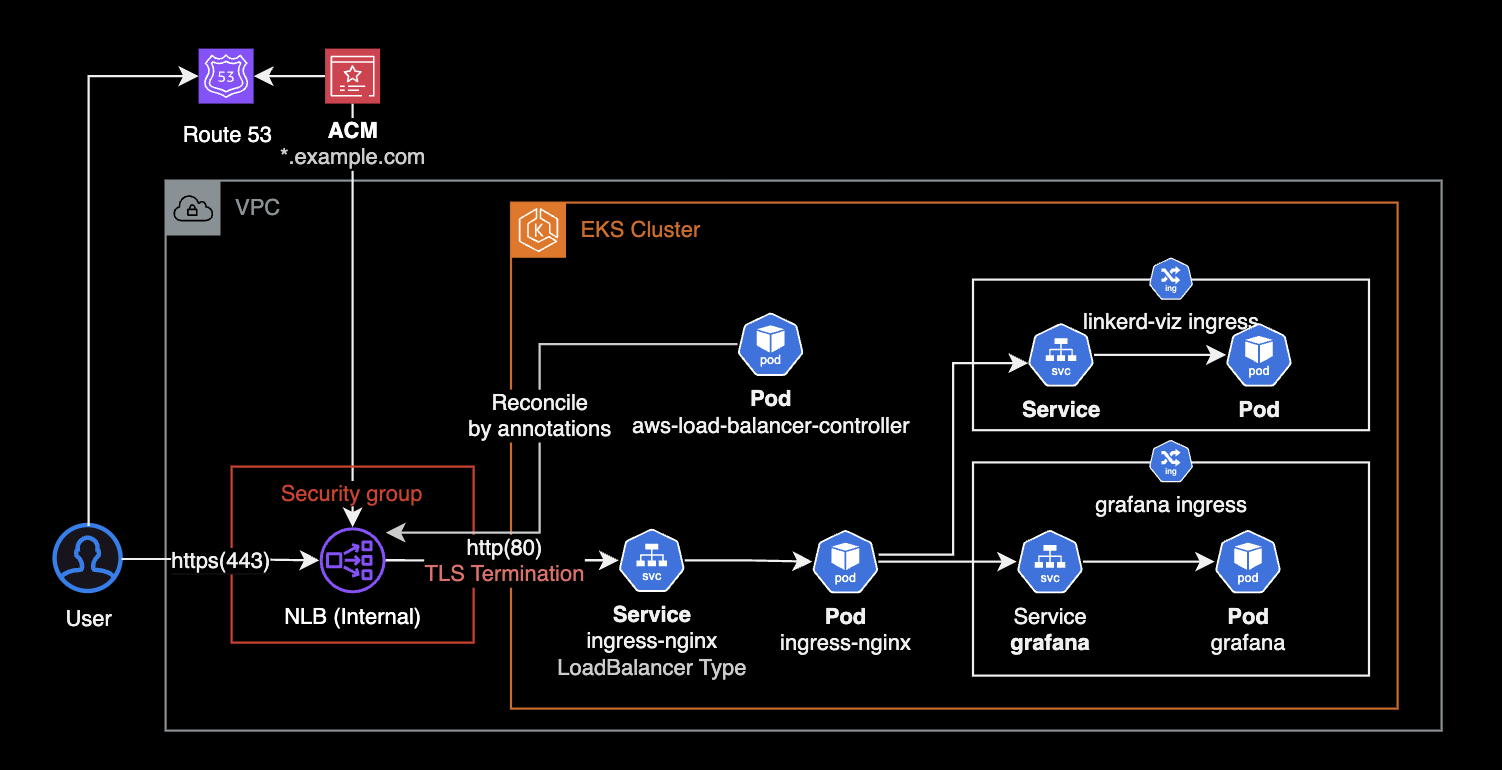
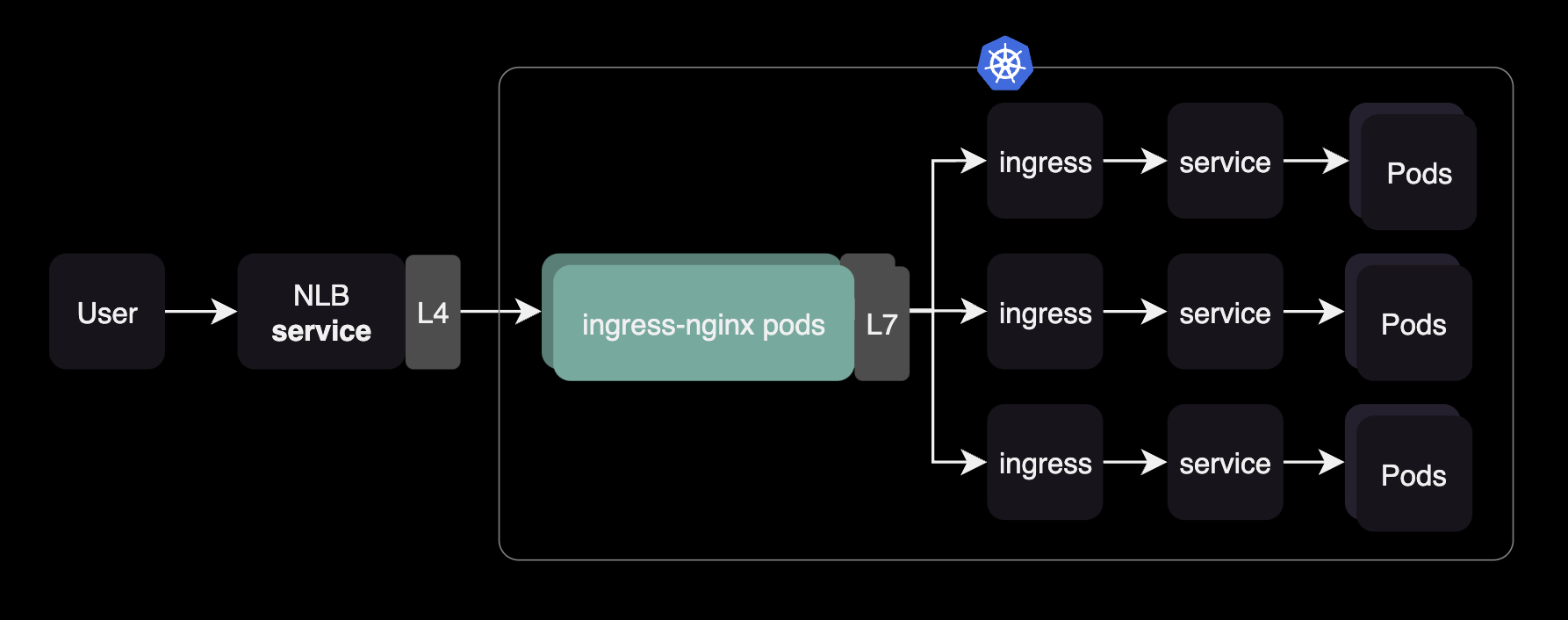
The network configuration accepts external user requests through an NLB and forwards them to the ingress-nginx controller within the cluster. Inside the cluster, the Ingress nginx controller pod receives traffic from the internal NLB and routes it to services based on Ingress resource routing rules.
Configuration Steps
Setting Up the ingress-nginx Helm Chart
To configure the ingress-nginx controller, we’ll use its Helm chart and customize the values.yaml file.
Service Configuration
Here’s an example configuration for the ingress-nginx service:
# ingress-nginx/values.yaml
controller:
  service:
    enabled: true
    external:
      enabled: true
    annotations:
      service.beta.kubernetes.io/aws-load-balancer-name: <INTERNAL_NLB_NAME>
      service.beta.kubernetes.io/aws-load-balancer-scheme: internal
      service.beta.kubernetes.io/aws-load-balancer-nlb-target-type: ip
      service.beta.kubernetes.io/aws-load-balancer-cross-zone-load-balancing-enabled: "true"
      service.beta.kubernetes.io/aws-load-balancer-ssl-cert: "arn:aws:acm:us-west-2:<ACCOUNT_ID>:certificate/<ACM_ID>"
      service.beta.kubernetes.io/aws-load-balancer-security-groups: sg-013f5ee1423faf2ca
      service.beta.kubernetes.io/aws-load-balancer-attributes: deletion_protection.enabled=true
This configuration creates an internal NLB with TLS termination using an ACM certificate, targeting the ingress-nginx controller pods.
High Availability and Pod Autoscaling
To ensure high availability and scalability, configure the Horizontal Pod Autoscaler (HPA):
# ingress-nginx/values.yaml
controller:
  autoscaling:
    enabled: true
    annotations: {}
    minReplicas: 2
    maxReplicas: 11
    targetCPUUtilizationPercentage: 50
    targetMemoryUtilizationPercentage: 50
    behavior: {}
The HPA scales the ingress-nginx pods based on 50% CPU or memory utilization, maintaining a minimum of 2 replicas and a maximum of 11.
Setting Default IngressClass
To set nginx IngressClass as the cluster's default:
# ingress-nginx/values.yaml
controller:
  ingressClassResource:
    name: nginx
    enabled: true
    default: true
Once the Helm chart is installed, the nginx IngressClass is created and set as the default. You can verify this with:
$ kubectl get ingressclass
NAME    CONTROLLER             PARAMETERS   AGE
alb     ingress.k8s.aws/alb    <none>       1d19h
nginx   k8s.io/ingress-nginx   <none>       1d19h
To explicitly assign an Ingress to the nginx controller, specify ingressClassName: nginx in the Ingress resource:
apiVersion: networking.k8s.io/v1
kind: Ingress
spec:
  ingressClassName: nginx
  ...
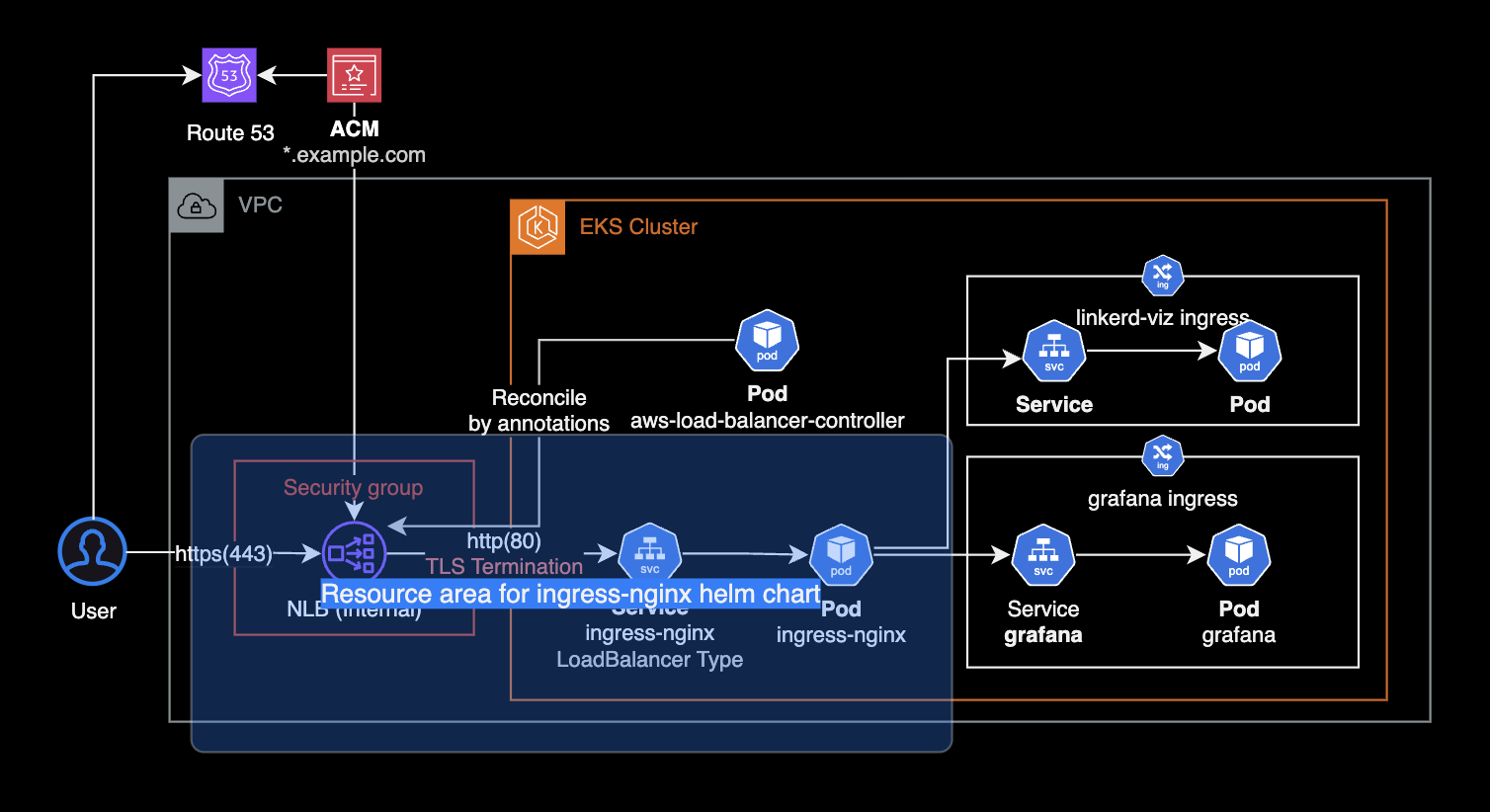
When you install the ingress-nginx Helm chart, it creates a LoadBalancer type Service resource. The AWS Load Balancer Controller (LBC) reads the annotations and provisions an NLB accordingly.
TLS Termination Configuration
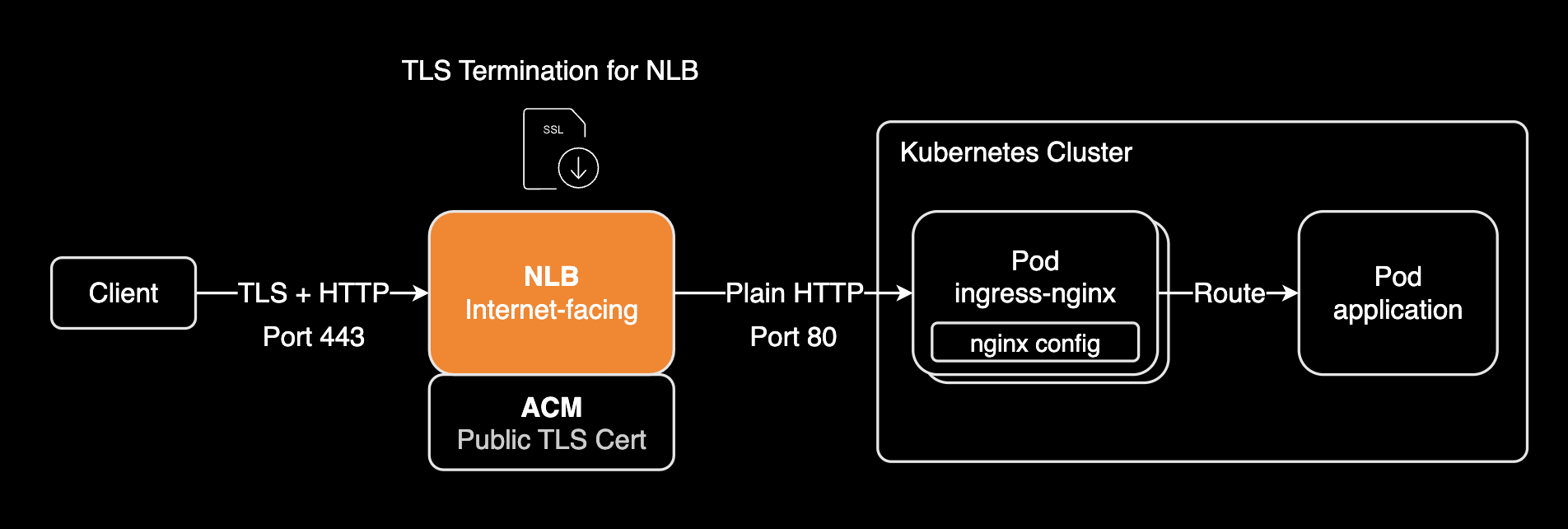
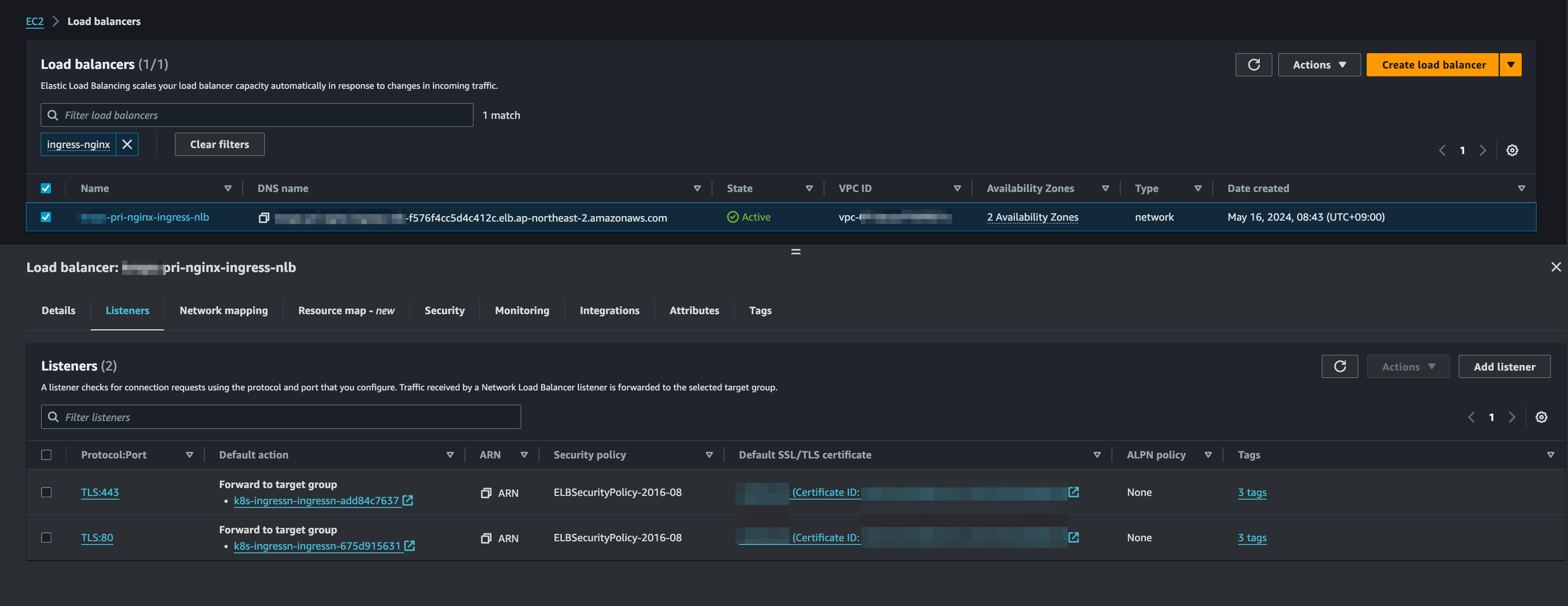
TLS termination at the NLB decrypts HTTPS traffic (port 443) from clients and forwards it as HTTP (port 80) to the ingress-nginx pods. This simplifies internal service management by offloading certificate handling and encryption to the NLB.
Without TLS termination, you might encounter a 400 Bad Request error (The plain HTTP request was sent to HTTPS port). See this GitHub issue for more details.
Update the service configuration to forward HTTPS traffic from port 443 to the ingress-nginx pod’s HTTP port (80):
Configure TLS termination at the NLB level:
controller:
  ...
  service:
    ...
    ports:
      # -- Port the external HTTP listener is published with.
      http: 80
      # -- Port the external HTTPS listener is published with.
      https: 443
    targetPorts:
      # -- Port of the ingress controller the external HTTP listener is mapped to.
      http: http
      # -- Port of the ingress controller the external HTTPS listener is mapped to.
-     https: https
+     https: http  # Changed from 'https' to 'http'
Redeploy the Helm chart to apply these changes. The AWS LBC will update the NLB listener accordingly.
 For further discussion, refer to this Stack Overflow thread.
Grafana Ingress Configuration
To route traffic from the ingress-nginx controller to Grafana, create a Grafana Ingress resource. Link it to the nginx IngressClass:
# kube-prometheus-stack/values.yaml
grafana:
  ingress:
    enabled: true
    ingressClassName: nginx
    annotations:
      nginx.ingress.kubernetes.io/rewrite-target: /
      nginx.ingress.kubernetes.io/ssl-redirect: "false"
Benefits and Considerations
-
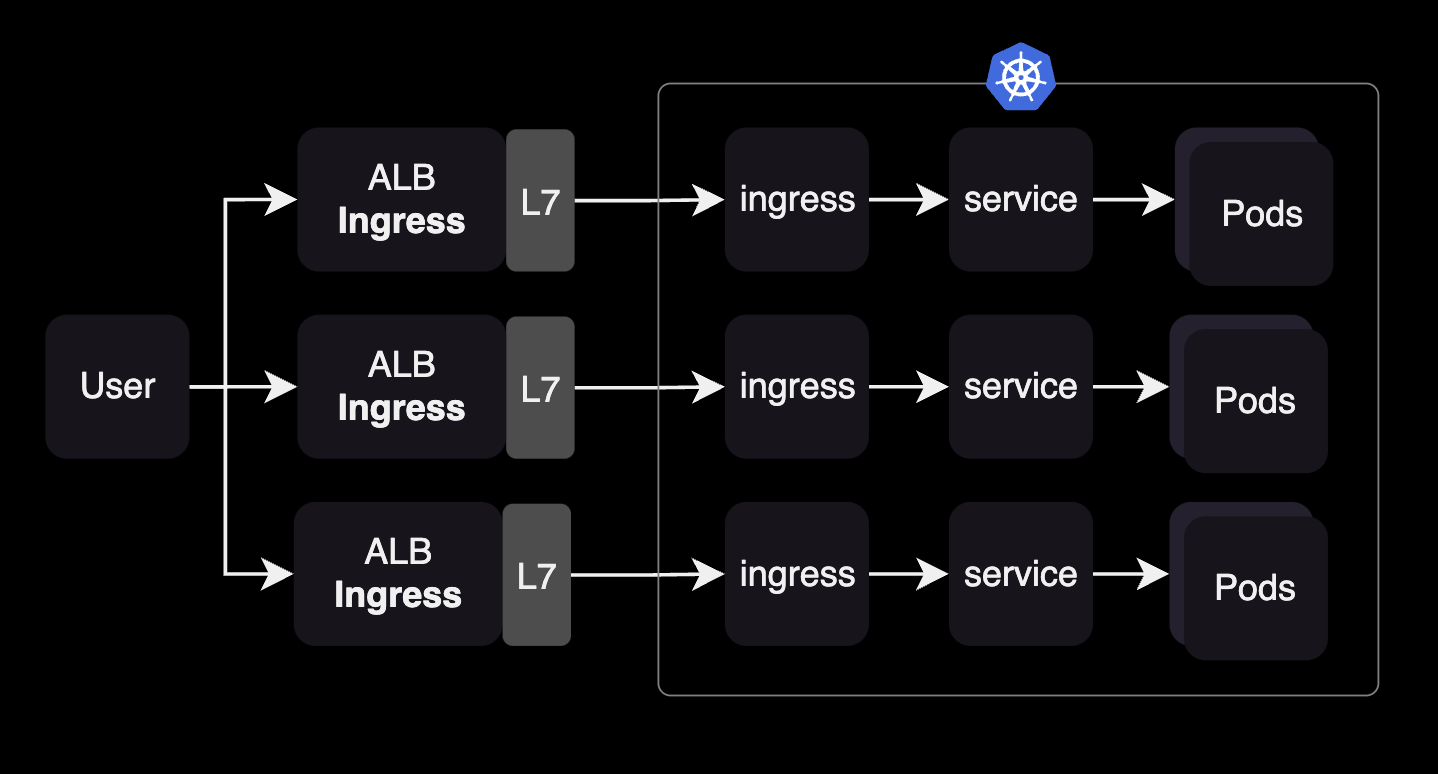
Centralized Traffic Management: The ingress-nginx controller allows easy routing control for multiple ingress resources across different namespaces through a single nginx pod.
-
Cost Efficiency: Without an Ingress controller, you'd need separate ALBs for each namespace's Ingress resources, increasing infrastructure complexity and costs.
-
Simplified SSL/TLS Management: TLS termination at the NLB level reduces the complexity of certificate management in individual services.
Best Practices
- Always use
spec.ingressClassNameinstead of the deprecatedkubernetes.io/ingress.classannotation (deprecated since Kubernetes v1.18). - Implement proper high availability with appropriate minimum replica counts.
- Configure meaningful resource limits and requests for the controller pods.
- Enable cross-zone load balancing for better availability.
Conclusion
The ingress-nginx controller provides a powerful and efficient way to manage incoming traffic in your Kubernetes cluster. It simplifies routing configuration, reduces infrastructure costs, and provides a centralized point of control for all ingress traffic.
By combining it with AWS NLB and ACM, you can create a robust, secure, and scalable ingress architecture for your Kubernetes applications.